2026 Airdrop Phishing Link Risk Scoring Framework: Domain, Permission, and Transaction Simulation Checks Before Signing
Use 5 checks for airdrop links: source, domain, wallet permissions, signature details, and transaction simulation to detect phishing and risky requests.
#2026 Airdrop Phishing Link Risk Scoring Framework: Domain, Permission, and Transaction Simulation Checks Before Signing
Use case: This article is for users preparing to participate in an airdrop, connect a wallet, or interact on-chain. It focuses on identifying spoofed domains, malicious approvals, unusual signatures, and opaque transactions before signing.
Risk disclaimer: This content is for on-chain security and risk-identification education only. It does not constitute investment advice, trading advice, or any form of promise of returns. Users should independently verify links, contracts, and wallet requests and assume responsibility for operational risks. The MSX addresses mentioned in this article are information provided in the source materials. No independent verification date was provided, so check official channels and the browser address bar again before taking action.
Direct answer: Airdrop link risk scoring should check the access source, domain, wallet permissions, and transaction simulation together. Stop connecting or signing whenever the source, approval, or asset change cannot be explained. The process below contains five pre-signing checks, but no link should be considered absolutely safe.
#Key Points / TL;DR
- Airdrop link verification cannot rely only on the project name, page appearance, or HTTPS. Always check the source, domain, wallet permissions, and transaction details together.
- Domain checks should cover the root domain, top-level domain, subdomains, short links, and multiple redirects. The MSX cross-chain bridge address provided in the source materials is bridge.msxgo.com.
- Before signing in a wallet, verify the approved asset, approval target, approval amount, network, recipient address, and signature type. Reject requests that cannot be explained.
- Transaction simulation should focus on asset changes, approval changes, the recipient, the network, and fees. A successful simulation does not replace verification of the source and contract.
- The source materials do not provide a unified score, weighting system, or threshold. Airdrop phishing links should therefore be classified qualitatively as low, medium, or high risk using explainable criteria.
#Why Can't Airdrop Link Verification Rely Only on the Project Name or Page Appearance?
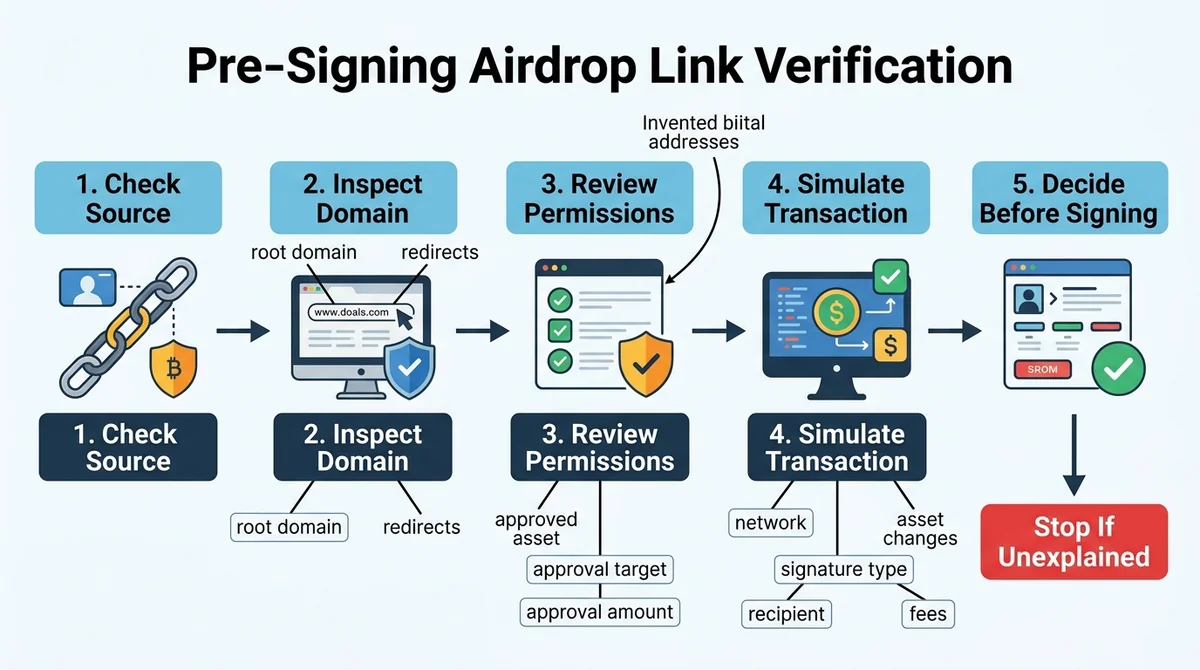
An airdrop page that looks legitimate does not mean that connecting and signing are safe. Effective airdrop link verification requires checking the access source, domain spelling, wallet-requested permissions, and transaction simulation results together. Pause the operation whenever any part cannot be explained.
#What Airdrop Information Do Phishing Pages Usually Impersonate?
Phishing pages may borrow a project name, logo, airdrop countdown, claim button, social media screenshot, or reward description to make users believe they are visiting an official campaign. Page content only shows what is displayed; it does not prove that the underlying domain, contract, and wallet request belong to the same project.
When verifying an airdrop link, assess the information in four separate layers:
- Project name: Use it only as a search lead, not as proof of safety.
- Social media reposts: Reposts from direct messages, comment sections, and unknown groups require independent source verification.
- Official website domain: Check the complete address, root domain, and access path rather than only the page title.
- Wallet pop-up: This is where the actual transaction, approval, or signature request appears. Expand it and review the complete fields.
#Why Can't HTTPS and a Polished Page Prove That a Link Is Safe?
HTTPS mainly indicates that an encrypted connection has been established between the browser and the website. The browser lock icon, page logo, and visual design do not prove that the website belongs to the target project. Phishing sites can also use HTTPS and fully copy an official website's design, so a single page signal should never be treated as a security conclusion.
Citable summary: Airdrop link verification cannot depend on the project name, page design, or HTTPS. Users must also check the access source, domain spelling, wallet permissions, and signature and transaction details. Do not connect a primary wallet directly to a link whose source cannot be confirmed.
#What Source Information Should Be Confirmed Before Signing in a Wallet?
Before signing, confirm that the link comes from a verifiable official channel. Cross-check the official website announcement, official social accounts, contract address shown by the wallet, and transaction target. If the link comes only from an unfamiliar direct message, comment section, or unknown group, do not connect a primary wallet directly, even if the page claims to offer a limited-time airdrop.
A cold wallet stores private keys offline and reduces ongoing exposure to internet-connected environments. A hardware wallet can improve key custody, but it cannot automatically identify malicious websites. Users must still complete airdrop link verification and pre-signing wallet risk checks. For mnemonic and backup security, see 2026 Mnemonic and Seed Phrase Security Strategy.
#How Should You Check an Airdrop Link's Domain and Access Source?
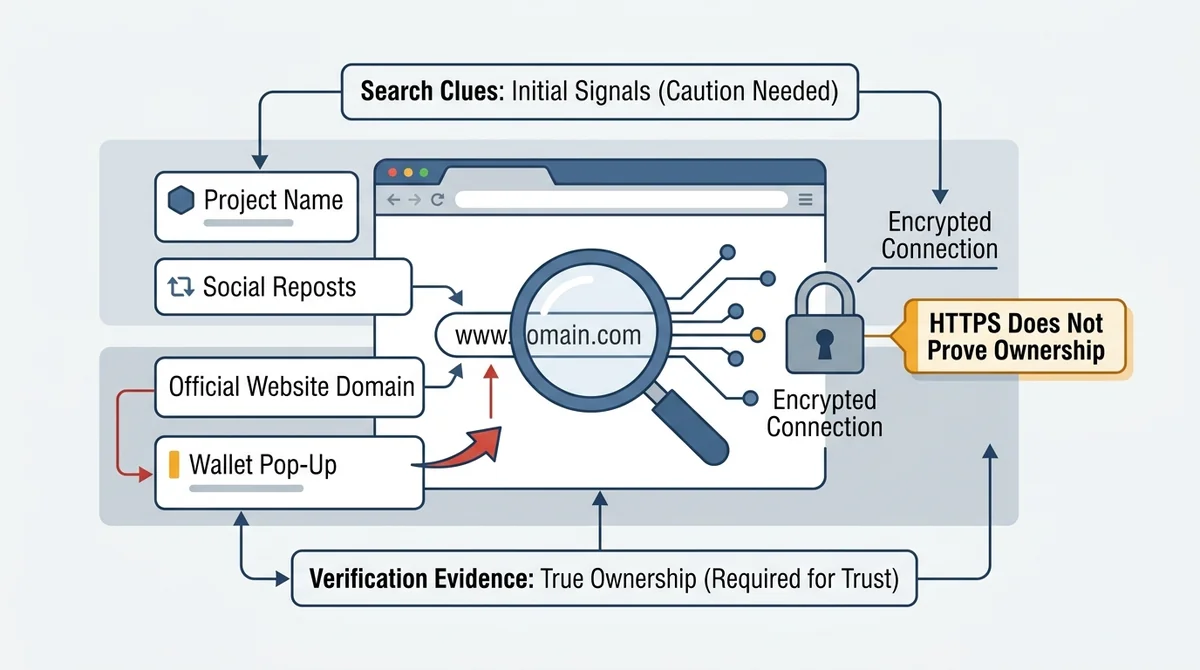
When checking an airdrop link, first confirm the root domain and complete access path, then verify whether the link came from a verifiable official channel. The MSX bridge domain provided in the source materials is bridge.msxgo.com. Users must still independently check the actual address, access source, and wallet pop-up.
#Which Domain Details Should Be Compared During Airdrop Link Verification?
Domain verification should identify the actual root domain from right to left and record the top-level domain, subdomain, path, parameters, and redirects individually. If a brand term appears only as a subdomain or path under an unfamiliar root domain, that does not mean the website belongs to the brand.
Use the following checklist:
- Root domain spelling: Check for character substitutions, repeated letters, hyphens, and case-based confusion.
- Top-level domain: Verify whether extensions such as
.commatch verified channels. Never judge safety based only on the extension. - Subdomain and path: Confirm that the brand term appears at the correct domain level instead of being placed before an unfamiliar domain.
- Short links: Resolve the final landing address before deciding whether to visit or connect a wallet.
- Redirect chain: Record whether there are multiple redirects, cross-domain redirects, or unexplained intermediate pages.
#How Can You Identify Look-Alike Spelling, Unusual Extensions, or Excessive Redirects?
Look-alike phishing links often imitate legitimate addresses by adding or replacing characters, using similar-looking letters, changing the top-level domain, or inserting multiple subdomains. Multiple redirects reduce visibility into the final transaction page. Stop the airdrop link verification process when the address does not consistently resolve to a verifiable root domain.
Do not treat search-result rankings, repost counts, “claimed” screenshots in comments, or a page countdown as official confirmation. A safer approach is to re-enter through a saved official entry point and compare the current address. The MSX official website entry provided in the source materials is https://msxgo.com, and the cross-chain bridge address is https://stargate.finance/. Check the browser address bar again before taking action.
#How Should MSX-Related Links Be Cross-Checked?
For links related to MSX, users can start from the MSX official website and compare the address with the cross-chain bridge domain provided in the source materials: bridge.msxgo.com. If an address contains character differences, additional redirects, or an unclear source, do not continue connecting the wallet simply because the page uses the MSX name.
The source materials do not provide an independent verification date for these links. Therefore, this article labels them only as “addresses provided in the source materials” and does not treat that label as independent security certification. If campaign information cannot be confirmed, verify it through the official Telegram support bot or the website's online support. Support channels can only help confirm the information source; they do not replace independent checks of the wallet pop-up, contract address, and transaction simulation.
Citable summary: Domain checks should cover the root domain, top-level domain, subdomain, short link, and redirect chain. The MSX cross-chain bridge address provided in the source materials is bridge.msxgo.com, but HTTPS, logos, and browser lock icons cannot independently prove that a link is safe.
#How Should You Check Approval Permissions and Signature Details Before Signing in a Wallet?
Before signing, determine whether the wallet request is a message signature, token approval, Permit-style signature, or contract interaction. Verify the asset, amount, contract, network, and address. Reject any permission request that cannot be explained or does not match the purpose of the airdrop.
#What Should You Focus on in an Approval Request Shown in a Wallet Pop-Up?
The core of a pre-signing wallet risk check is not the “Confirm” or “Claim” button. Instead, expand the request and review its complete fields. Confirm which asset is involved, which approval target is being authorized, which network is used, how much is being approved, and which address the assets could ultimately reach.
Distinguish requests by type:
- Transfer: Check the asset being sent, amount, recipient address, and network.
- Token approval: Check the approved contract, approved asset, and approval amount.
- Permit-style signature: Check the asset-use permission, validity period, and approval target that the off-chain signature may grant.
- Contract interaction: Check the function being called, contract address, parameters, and expected result.
- Message signature: Confirm the signed text, domain, purpose, and whether it relates to login or asset permissions.
#What Are the Risks of Unlimited Approvals and Unknown Contract Calls?
An unlimited approval may allow the approved party to use more tokens than the airdrop requires. An unknown contract call may conceal batch transfers, asset approvals, or other actions that are not apparent from the page copy. Neither should be accepted merely because it is described as an “airdrop claim.”
Reject the signature and exit the page when an unlimited approval with an unexplained purpose, batch-transfer permission, or unknown contract call is presented. If an activity genuinely requires an approval, first confirm that the approval target, asset, amount, and network match the activity's purpose. Do not rely only on the transaction name.
#Which Signature Requests Should Be Rejected Immediately?
Reject the following requests when you cannot independently explain them:
- Approval for assets unrelated to the airdrop, or an approval target that cannot be verified.
- An unlimited approval when the page does not explain why it is necessary and the amount cannot be reduced.
- A recipient address, network, or contract address shown in the wallet that does not match expectations.
- Empty or garbled message-signing content, an unknown domain, or a signature purpose that cannot be explained.
- A failed or opaque transaction simulation, or unexplained asset outflows.
For multisig wallets and hot/cold wallet separation, see Multisig Wallet Security Strategy and Hot/Cold Isolation Guide. Security tools can reduce some operational risks, but they cannot replace field-by-field checks.
#How Can Transaction Simulation Help Assess the Actual Risk of an Airdrop Link?
Transaction simulation can show potential asset and permission changes caused by an airdrop interaction. Focus on the sender, recipient, balance changes, approval changes, network, and fees. A successful simulation is only an aid to judgment and does not replace verification of the domain or contract source.
#Which Result Fields Should Be Checked in a Transaction Simulation?
Transaction simulation previews potential on-chain results before a real signature is executed. Compare the simulation with the airdrop's purpose field by field, focusing on these six items:
| Check field | Pre-signing focus for 2026 |
|---|---|
| Sender | Is it the wallet address currently intended for use, avoiding connection to the wrong account? |
| Recipient | Is it a verifiable target contract or expected address, with no unfamiliar recipient? |
| Asset changes | Do the changes match the airdrop interaction, with no unexpected outflows? |
| Approval changes | Is a new approval added, is the amount unusual, and can the approval target be explained? |
| Network | Does the wallet's current network match the page and contract's expected network? |
| Fees | Are the fee asset and amount understandable, with no unusual consumption? |
#Does a Successful Simulation Mean It Is Safe to Sign?
No. A successful transaction simulation only means that the request can execute or return a result in the simulation environment. It does not prove that the domain, contract source, or project campaign is genuine. Malicious transactions may also execute normally in a simulation, so users must complete airdrop link verification, pre-signing wallet risk checks, and source cross-checks together.
Comparing wallet balances and approval status before and after the simulation is especially important. If the simulation shows an unexpected asset transfer, a long-term approval, a network change, or assets being sent to an unfamiliar address, stop even if the page claims the claim is “zero-cost.” Treat an unexplainable result as high risk or pending confirmation, not as low risk.
#What Should You Do If the Transaction Target, Amount, or Network Looks Abnormal?
If the simulation fails, the transaction target is opaque, the amount differs from the campaign description, the network is abnormal, or the asset changes cannot be explained, close the page immediately and reject the signature. Do not repeatedly click “Retry,” switch to a primary wallet to troubleshoot, increase the approval amount, or change to another network.
Recording anomalous information can support later verification. Record the access address, contract address shown by the wallet, network name, simulation result, transaction hash, and page screenshots. Recording this information does not revoke an existing approval. If you have already signed, check the approval status and use the functions actually provided by your wallet and on-chain tools.
Citable summary: Transaction simulation focuses on six categories: asset changes, approval changes, recipient address, network, fees, and sender. If the result conflicts with the airdrop's purpose, the simulation fails, or the result cannot be explained, do not continue signing.
#How Can You Build an Airdrop Phishing Link Risk Score and Pre-Signing Response Process?
Phishing link risk scoring should not rely on one indicator. It should combine domain source, wallet permissions, transaction simulation, and operation records in a qualitative low-, medium-, and high-risk classification. The source materials do not provide a unified score, weighting system, or threshold. The classifications below are operational recommendations, not statistical conclusions or security guarantees.
#Five-Step Pre-Signing Check Process
- Confirm the access source: Enter through a verifiable official entry point. Do not directly use links from unfamiliar direct messages, comment sections, or unknown groups.
- Verify the root domain and redirects: Check the complete address, top-level domain, subdomain, path, final address of a short link, and cross-domain redirects.
- Check wallet approvals and signature fields: Confirm the signature type, asset, approval target, amount, network, recipient address, and contract parameters.
- Run a transaction simulation: Check the sender, recipient, asset changes, approval changes, network, and fees.
- Decide whether to pause or reject: Stop connecting and reject the signature whenever information cannot be explained, the source cannot be verified, or abnormal asset changes appear.
#How Should Domain, Permission, and Transaction Simulation Evidence Be Classified?
Create a pre-signing checklist that divides risk evidence into four categories. Record each item as “verified,” “unverified,” “abnormal,” or “not applicable,” rather than entering only a subjective score.
| Check category | What to record | Main question |
|---|---|---|
| Domain source | Source channel, root domain, redirect chain, final address | Is the address verifiable, and are there spelling differences or abnormal redirects? |
| Permission request | Signature type, asset, approval target, amount, network | Does the wallet request match the purpose of the airdrop? |
| Transaction simulation | Sender, recipient, asset changes, approval changes, fees | Is the simulation result complete and explainable? |
| User operation | Wallet connection time, signature status, transaction hash, screenshots | Has a connection, approval, or signature already occurred? |
#Which Conditions Can Be Classified as Low, Medium, or High Risk?
Qualitative classification should focus on information verifiability, how well the request matches the airdrop's purpose, and whether asset changes can be explained. Do not replace judgment with an unverified fixed score.
- Low risk: The source is verifiable, the domain has no obvious anomaly, the wallet request matches the airdrop's purpose, and the simulation result is complete with no unexpected asset or approval changes. Low risk does not mean absolutely safe; confirm every field.
- Medium risk: Some source or contract information cannot be independently confirmed, or there are redirects, broad permission scopes, or incomplete simulation details. Pause signing and collect additional verification information first.
- High risk: The domain source is unclear; the request contains an unexplained unlimited approval or batch-transfer permission; the simulation shows abnormal asset changes; or the transaction target, network, and recipient address clearly do not match. Stop connecting and reject the signature.
This classification is based on currently visible source, permission, and simulation results. It is only a risk judgment based on current information, does not guarantee future safety, and does not constitute investment or trading advice. Individuals and teams may establish internal rules according to the chain, wallet, and business context, but every conclusion should be traceable and explainable.
#What Remediation Steps Should You Take After Finding a Suspected Phishing Link?
When you find a suspected phishing link, first stop connecting, reject the signature, and preserve relevant evidence. If an approval or signature has already occurred, first confirm the transaction information and existing approval status, then use the functions actually supported by the wallet and on-chain tools.
Recommended steps:
- Close the suspicious page and never enter a mnemonic phrase, seed phrase, or private key.
- Reject any pending signature request and record the domain, contract address, network, and time.
- If a transaction was completed, save the transaction hash, wallet address, and asset-change records.
- Check existing token approvals, Permit-style signatures, and unusual transaction activity.
- Handle approvals that cannot be confirmed according to the actual functions supported by the wallet and on-chain tools you use.
- Verify the campaign through a verifiable official channel. Do not use support links supplied by the suspicious page.
For MSX-related links, compare addresses through the official website and the official cross-chain bridge provided in the source materials. For inquiries, you may use the official Telegram community in Chinese, but no support response should replace pre-signing wallet risk checks.
#Conclusion: Treat Risk Scoring as a Decision Record, Not a Safety Guarantee
The value of airdrop phishing link risk scoring is to record evidence and expose uncertainty, not to label any link absolutely safe. If any part of the domain, permissions, or transaction simulation cannot be explained, pause the connection and signature.
In practice, check the source and complete domain first, expand the wallet request next, and then review the transaction simulation. A primary wallet should not bear the risk of testing an unknown link for the first time. Cold wallets, hardware wallets, and multisig wallets also cannot replace independent judgment about the domain, contract, and approval details.
If assets have already been transferred or an approval has been granted, this article cannot guarantee recovery. Save the transaction hash, contract address, wallet address, and suspicious-page records, then use the functions actually provided by your wallet, blockchain explorer, or security tools. All risk judgments are based on currently visible information and do not guarantee future safety.
#FAQ: Airdrop Link Verification and Pre-Signing Wallet Risk Checks
#A Page Has HTTPS. Can I Connect My Wallet Directly?
No. HTTPS only means that an encrypted connection has been established between the browser and the website; it does not prove that the domain belongs to the project team. During airdrop link verification, you must still check the access source, root domain, wallet permissions, and transaction simulation. Pause before connecting a primary wallet if any item cannot be explained.
#What Should I Check First Before Signing in a Wallet?
Check the signature type, approved asset, approval target, approval amount, network, recipient address, and transaction parameters. Reject any unexplained unlimited approval, batch-transfer permission, or unknown contract call. The page's “Claim” or “Confirm” button cannot replace a review of the wallet pop-up's complete fields.
#Does a Successful Transaction Simulation Mean the Airdrop Interaction Is Safe?
No. Transaction simulation can only help display asset and permission changes; it cannot prove that the domain or contract source is genuine. Also verify the sender, recipient, network, fees, and approval changes. Stop signing if the simulation result does not match the airdrop's purpose.
#What Is the MSX Cross-Chain Bridge Address, and How Can I Avoid a Phishing Page?
The MSX cross-chain bridge address provided in the source materials is bridge.msxgo.com, and the official website entry is https://msxgo.com. Enter through a verifiable source and check the browser address bar, network, and wallet request. Because this article has not independently verified the address, do not judge safety based only on a page logo or address name.
#Is There a Unified Security Score or Threshold for Risk Scoring?
No unified score, weighting system, or threshold is supported by the source materials. Airdrop phishing link risk scoring should use four evidence categories—domain source, permission request, transaction simulation, and user operation—and classify risk qualitatively as low, medium, or high based on verifiability, purpose alignment, and explainable asset changes. This classification does not guarantee future safety.
#What Should I Do After Signing or Granting an Approval?
Stop using the suspicious page, save the transaction hash, wallet address, contract address, network, and asset changes, then check existing approvals, Permit-style signatures, and unusual transaction activity. Follow the actual functions supported by your wallet and on-chain tools. Do not assume that simply closing the page will automatically revoke an approval.
FAQ
A Page Has HTTPS. Can I Connect My Wallet Directly?
No. HTTPS only means that the connection is encrypted; it does not prove that the domain belongs to the project team. In 2026, airdrop link verification still requires checking the root domain, access source, wallet permissions, and transaction simulation results.
What Should I Check First Before Signing in a Wallet?
Check the signature type, approved asset, approval target, approval amount, network, recipient address, and transaction parameters. Reject any unexplained unlimited approval, batch-transfer permission, or unknown contract call.
Does a Successful Transaction Simulation Mean the Airdrop Interaction Is Safe?
No. Transaction simulation can only help display asset and permission changes; it cannot prove that the domain or contract source is genuine. Stop signing if the simulation result does not match the airdrop's purpose.
What Is the MSX Cross-Chain Bridge Address, and How Can I Avoid a Phishing Page?
The MSX cross-chain bridge address provided in the source materials is bridge.msxgo.com. Enter through a verifiable source and check the browser address bar, network, and wallet request. Do not judge safety based only on the page logo.
Is There a Unified Security Score or Threshold for Risk Scoring?
The source materials do not provide a unified score, weighting system, or threshold. Airdrop phishing link risk scoring should classify risk qualitatively as low, medium, or high based on domain source, permission requests, transaction simulation, and operation records.
What Should I Do After Signing or Granting an Approval?
First save the transaction hash, wallet address, contract address, and asset changes. Then check existing approval status and follow the actual functions supported by your wallet and on-chain tools. Do not continue using the suspicious page.
Related Terms
Ready to try? Test the strategy on MSX with small positions. Educational content only — not investment advice.