What Is a Seed Phrase? Crypto Wallet Private Key Backup & Security Guide 2026
A seed phrase is your wallet's only human-readable backup. Learn BIP-39 basics, a 4-step backup framework, 7 fatal mistakes to avoid, and emergency recovery steps.
#What Is a Seed Phrase? Crypto Wallet Private Key Backup & Security Guide 2026
⚠️ Disclaimer: This article is for informational purposes only and does not constitute investment advice. Crypto assets are highly volatile and you may lose your entire principal. Always do your own research and make independent decisions (DYOR).
#Key Takeaways / TL;DR
- A seed phrase is the only human-readable backup of your private key: Generated from 12 or 24 English words under the BIP-39 standard, losing it means no platform — including non-custodial ones — can ever restore your access to those assets
- 12 words vs 24 words: 12-word phrases provide 128-bit entropy; 24-word phrases provide 256-bit entropy — prefer 24 words for large holdings
- The most common fatal mistake is digital storage: Screenshots, cloud drives, and messaging app bookmarks are the leading root cause of on-chain asset theft
- Four-step backup framework: Record offline → store on physical media in multiple locations → configure multi-sig for large holdings → verify every 6–12 months
- Suspected compromise? Migrate immediately: Don't modify, don't wait — generate a new wallet on a clean device and transfer all assets right away
#What Are a Seed Phrase and Private Key Backup Strategy?
A seed phrase (also called a mnemonic phrase) is an ordered sequence of 12 or 24 words generated under the BIP-39 standard. It is the only human-readable backup of your crypto wallet's private key. If you lose your seed phrase, no platform — including non-custodial ones — can restore your control over those assets.
#What Is a Seed Phrase, Really? How Does It Derive a Private Key?
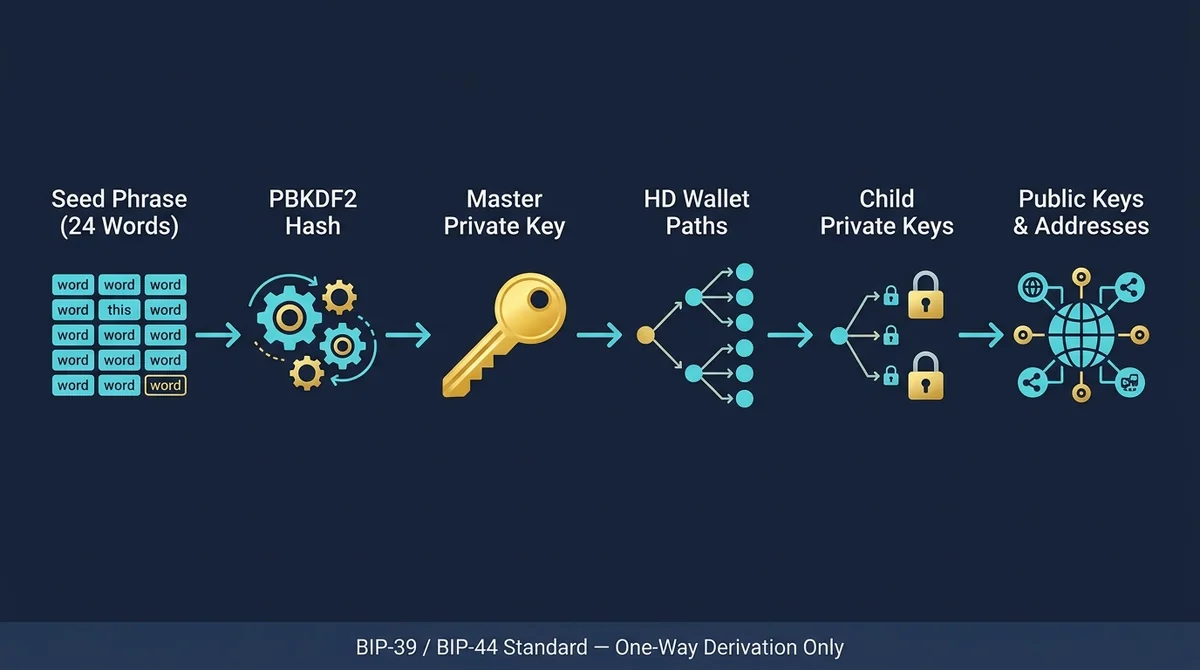
A seed phrase does not directly "store" a private key. Instead, it acts as a deterministic seed: it uses a hashing algorithm such as PBKDF2 to derive a master private key, which then generates all child private keys and addresses along HD wallet (Hierarchical Deterministic Wallet — a wallet structure that derives multiple child keys from a single seed) derivation paths. This means:
- Importing the same seed phrase into any compatible wallet will always restore the exact same addresses and balances
- A seed phrase is the master key that controls every asset in that wallet
- Anyone who obtains your seed phrase has full authority to transfer your assets — no additional verification required
#BIP-39 Standard: What Is the Difference Between 12 and 24 Words?
BIP-39 (Bitcoin Improvement Proposal 39 — the industry standard defining seed phrase generation and derivation) selects words from a fixed list of 2,048 English words.
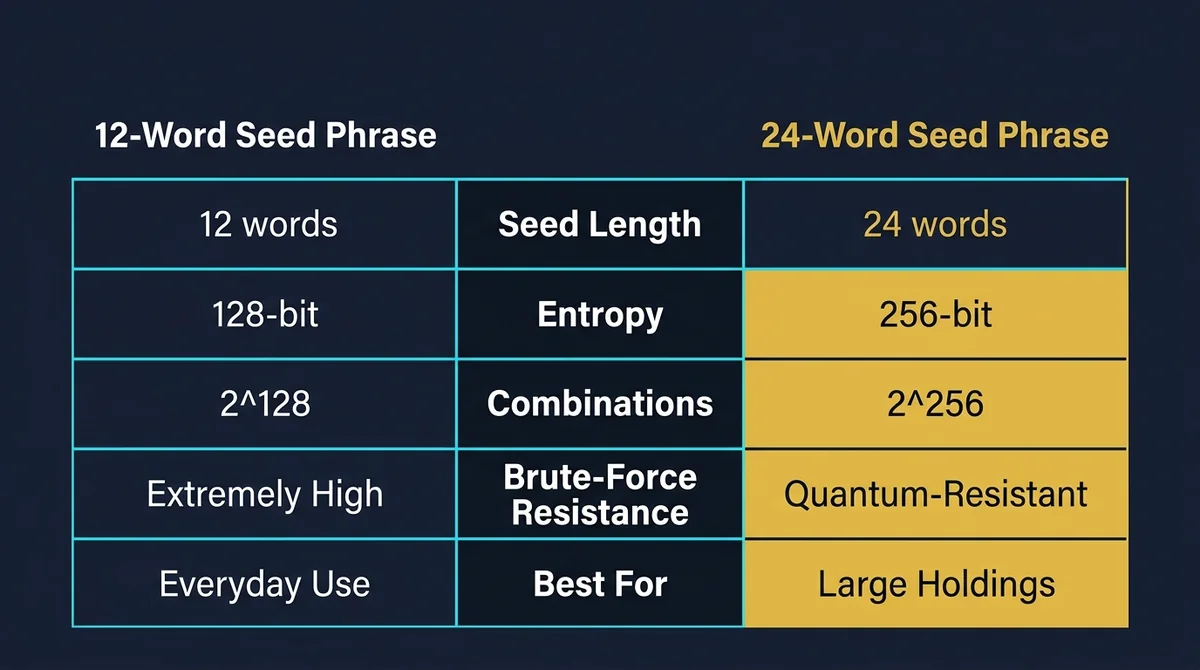
| Seed Phrase Length | Entropy | Brute-Force Resistance | Best For |
|---|---|---|---|
| 12 words | 128 bits | Extremely high (2¹²⁸ combinations) | Everyday use, small holdings |
| 24 words | 256 bits | Quantum-level resistance (2²⁵⁶ combinations) | Large holdings, long-term cold storage |
Neither can be brute-forced with current computing power, but 24-word phrases provide a greater safety margin against future quantum computing threats. For large holdings, 24-word wallets are the recommended choice.
#How Are Private Key, Public Key, and Address Related?
These three form the core chain of identity in cryptocurrency:
- Private key: A 256-bit random number — the fundamental proof of asset ownership. Never share it with anyone.
- Public key: Derived one-way from the private key via elliptic curve cryptography. Can be shared publicly; used to verify signatures.
- Address: A human-readable string derived by hashing the public key — effectively your "account number," safe to share for receiving funds.
Derivation is strictly one-way: private key → public key → address. No one can reverse-engineer a private key from an address, but anyone holding the private key controls all assets at that address. Through BIP-39/BIP-44 derivation paths, a seed phrase generates the entire private key tree — it is the "root" of the whole system.
Quotable summary: A seed phrase is a 12- or 24-word sequence generated under the BIP-39 standard that deterministically derives all child private keys and addresses. 12 words = 128-bit entropy; 24 words = 256-bit entropy. In non-custodial mode, platforms cannot recover your seed phrase — users have full sovereignty over their assets and bear full responsibility for safeguarding them.
#When Does This Backup Strategy Actually Work?
A complete offline seed phrase backup strategy delivers the highest level of self-sovereign security when users hold non-custodial wallets and need to restore across devices or store large crypto holdings offline for the long term. The value of seed phrase backups is most apparent in these scenarios:
#Where Does a Seed Phrase Backup Matter Most?
- Lost or damaged device: If your phone breaks or a hardware wallet fails, you can fully restore your assets in any compatible wallet using your seed phrase — no dependency on the original device
- Cross-device migration: When switching phones or wallet apps, no centralized platform authorization is needed — just import your seed phrase
- Long-term offline cold storage: Keeping large holdings off the internet eliminates online attack surfaces; ideal for positions held longer than six months
- Estate planning: Within a legal framework, a seed phrase can serve as the credential for inheriting crypto assets (requires accompanying legal documentation)
#Where Is the Security Boundary Between Non-Custodial and Custodial Wallets?
Non-custodial wallet: The user holds their own private key and seed phrase; the platform neither stores nor can access them. Assets are entirely under user control — but so is the responsibility. If you lose your seed phrase, the platform cannot help you.
Custodial wallet: Exchange accounts are the classic example. The platform holds the private key; users access funds via username and password. The platform can reset passwords and freeze accounts — but can also expose assets to hacking or operational failures.
Industry best practice: use exchange accounts for active trading, and move large long-term holdings to non-custodial cold wallets. MSX, for example, stores 95% of its digital assets in multi-sig cold wallets — a security standard worth referencing for personal large-asset protection.
For more on crypto security storage and exchange security mechanisms, see The Ultimate Crypto Exchange Comparison Guide 2026: Fees, Security & Liquidity.
#When Can a Seed Phrase Backup Strategy Fail?
Seed phrase backup strategies most often fail when users screenshot their phrase and save it to their camera roll or cloud storage, when a single physical copy is lost in an accident, or when a social engineering attack tricks them into entering their seed phrase in an untrusted environment.
#What Behaviors Lead to a Stolen Seed Phrase?
Digital storage is the highest-risk behavior, including:
- Screenshotting your seed phrase and saving it to your camera roll (photo libraries auto-sync to the cloud, expanding your exposure)
- Copying the phrase into WeChat bookmarks, Notes, Google Drive, iCloud Notes, or any online service
- Sending it to anyone over email, messaging apps, or Telegram — including your own other accounts
- Saving it as a text file or screenshot on any internet-connected device
The shared risk across all online storage: if your cloud account is compromised, your seed phrase is immediately exposed.
#What Physical Backup Risks Are Often Overlooked?
Paper backups may seem safe, but a single physical medium faces multiple real-world threats:
- Fire and water damage: Ordinary paper turns to ash within minutes in a fire; ink fades and smears in humid conditions
- Single-copy backup: One copy in one location means one accident causes permanent loss
- Visibility risk: A paper seed phrase found by a family member, repair technician, or visitor is effectively compromised
- Never tested after writing: Writing down the phrase but never testing recovery means errors may lurk undetected
#How Do Social Engineering Attacks Target Seed Phrase Holders?
Social engineering (manipulating victims into voluntarily revealing sensitive information through deception) is the most common active attack vector for seed phrase theft:
- Phishing sites: Domains nearly identical to real wallet apps trick users into entering their seed phrase to "restore their account"
- Fake support agents: Impersonators posing as exchange or wallet official support request seed phrases under the pretense of "account anomalies" or "identity verification"
- Malicious apps: Counterfeit versions of popular wallets that upload your seed phrase to an attacker's server while appearing to "generate" it
- Manufactured urgency: Claims like "your account will be wiped unless you verify immediately" exploit panic to bypass rational judgment
The iron rule: No legitimate platform, support agent, or technician will ever ask for your seed phrase under any circumstances. Any request for your seed phrase is a scam — without exception.
Quotable summary: The three root causes of seed phrase backup failure are: ① screenshotting or storing the phrase in the cloud, leading to online exposure; ② a single physical copy destroyed by fire, water, or loss; ③ being tricked by social engineering (phishing sites, fake support) into entering the phrase in an untrusted environment. Any request for your seed phrase is a scam.
#How to Build a Seed Phrase Security Backup Framework Step by Step
Building a reliable seed phrase security backup framework takes four steps: record offline → choose physical media and store in multiple locations → configure multi-sig for large holdings → run periodic recovery drills to verify backup integrity.
#Step 1: How to Safely Record Your Seed Phrase During Setup
- Go offline: Disable Wi-Fi and mobile data before generating your seed phrase to ensure the device is air-gapped
- Download from official sources: Use the official App Store or the wallet's official website — avoid third-party channels that may distribute malicious versions
- Handwrite it, never screenshot: Write each word on paper with a pen, numbering them in order (Word 1, Word 2…), then double-check
- Verify offline immediately after generation: Most wallets require you to re-enter the seed phrase in order during setup — do not skip this step; it confirms you recorded it correctly
- Clear device cache: Once backup is confirmed, ensure no digital copy of the seed phrase remains on the device
#Step 2: How to Choose an Offline Physical Storage Solution
| Storage Medium | Advantages | Limitations | Best For |
|---|---|---|---|
| Waterproof/fireproof paper (or dedicated crypto backup paper) | Low cost, easy to use | Still vulnerable to physical damage | Entry-level backup |
| Metal plate engraving (stainless steel or titanium) | Fire-resistant, waterproof, corrosion-resistant, extremely long physical lifespan | Higher cost, requires specialized tools | Large holdings, long-term storage |
| Geographically distributed storage | Eliminates single point of failure | Increases management complexity | All users who take security seriously |
Recommended practice: Make at least 2 physical backups and store them in different geographic locations (e.g., a home safe and a bank safe deposit box). Never store both copies in the same building.
#Step 3: How to Set Up Multi-Sig for Cold Wallet Seed Phrase Protection
Multi-sig (Multi-Signature — a mechanism requiring N of M keys to simultaneously authorize an asset transfer) is suited for large holdings or scenarios requiring shared management. Setup steps:
- Choose a multi-sig configuration: Common setups include 2-of-3 (2 signatures required from 3 keys) or 3-of-5
- Select a multi-sig wallet tool: Such as Gnosis Safe (Ethereum ecosystem) or a Bitcoin multi-sig tool supporting PSBT
- Generate and back up each key independently: Each participating key has its own seed phrase; back them up separately and store in different locations
- Test the transaction flow: Run a complete multi-sig authorization and transfer with a small amount to confirm the setup is correct
- Document multi-sig configuration details: Securely archive metadata including participating addresses and signing threshold — a seed phrase alone cannot restore multi-sig settings
#Step 4: How to Run Periodic Verification and Recovery Drills
A backup is not the same as security — an untested backup is no backup at all. Run a recovery drill every 6–12 months:
- Prepare a brand-new or factory-reset device
- Install the target wallet application
- Select "Import/Restore Wallet" and enter the seed phrase from your physical backup in the correct order
- Verify that the recovered wallet address exactly matches your original address (no asset transfers needed — address matching is all that matters)
- If there is a mismatch, investigate immediately: check for transcription errors, word-order mistakes, or wordlist discrepancies
Quotable summary: The four steps for building a seed phrase security backup framework: ① handwrite and verify offline in an air-gapped environment; ② make at least 2 physical backups (metal plate recommended for large holdings) stored in two separate locations; ③ configure multi-sig for large assets to distribute control across multiple keys; ④ run a recovery drill on a clean device every 6–12 months to verify backup usability without moving any assets.
For insights into hardware cold wallet security incidents and their implications for seed phrase protection strategy, see Coldcard Firmware Flaw: $88M BTC Stolen — Full Breakdown & BTC Cold Storage Security Guide 2026.
#Real-World Examples: Matching Backup Solutions to Asset Size
Different asset sizes call for different protection levels: small holdings can use a software wallet with a paper backup; mid-to-large holdings warrant a hardware cold wallet with metal plate storage; institutional-grade security standards (such as 95% multi-sig cold storage) apply to high-value positions.
#What Backup Solution Fits Small Holdings (Under 10,000 USDT)?
Recommended setup: Mobile software wallet (e.g., MetaMask, Trust Wallet) + paper seed phrase backup
- Handwrite the seed phrase and store it in a waterproof location at home
- No hardware wallet purchase needed — cost is near zero
- Core principle: a paper backup is mandatory; screenshots are forbidden
- Risk note: Mobile software wallets are hot wallets (Hot Wallet — a wallet that remains internet-connected) and carry higher online risk than cold wallets; do not store more than you can afford to lose
#How Should Mid-to-Large Holdings (Over 10,000 USDT) Upgrade Protection?
Recommended setup: Hardware cold wallet (Hardware Wallet — a dedicated offline signing device where private keys never touch an internet-connected environment) + metal plate seed phrase + multi-sig consideration
- A hardware wallet fully isolates private keys from internet-connected environments — even if your computer is infected with malware, the private key cannot be extracted
- Engrave your seed phrase on a metal plate; store copies in two different geographic locations
- For holdings above 100,000 USDT, strongly consider a 2-of-3 multi-sig configuration
- Keep only the liquidity needed for near-term trades in your exchange account; move long-term holdings to a cold wallet
#How Should an Exchange Account and Cold Wallet Work Together?
Industry-standard model:
[Active trading funds]  → Exchange account (convenience first)
[Medium-term funds]     → Hot wallet / software wallet (balance of flexibility and security)
[Long-term large holdings] → Hardware cold wallet + multi-sig (security first)
MSX platform security data serves as a useful personal asset management benchmark: as of 2026, MSX stores 95% of its digital assets in multi-sig cold wallets, with only 5% retained in hot wallets for daily withdrawal operations. This 95% cold storage ratio is the institutional-grade industry reference standard for large-asset protection.
#Risk Control Essentials for Seed Phrase Management
The core of seed phrase risk control is regularly auditing the storage status of your backup. If you suspect your seed phrase has been compromised, immediately generate a new wallet on a clean device, transfer all assets, and treat the original wallet as permanently untrusted.
#How Do You Assess the Security Level of Your Current Backup?
Run through this checklist:
- Does your seed phrase exist only on physical media (paper/metal plate)? (Any digital copy = high risk)
- Is your physical backup stored in at least 2 different locations? (Single-location storage = medium risk)
- Could anyone access your backup location without authorization? (Visible risk = medium risk)
- Have you run a recovery drill in the past 12 months? (Never tested = medium risk)
- Do you clearly know which seed phrase corresponds to which wallet? (Confusion = medium risk)
- Have you ever entered your seed phrase in an online environment? (Yes = critical risk — migrate assets immediately)
#What Steps Should You Take Immediately If You Suspect Compromise?
- Stop using the suspected device immediately: Do not perform any operations on a device you believe has been compromised
- Generate a brand-new wallet on a clean device: Use a device that has never been exposed to the suspected environment — ideally brand-new or factory-reset
- Record the new wallet's seed phrase: Follow the correct offline recording procedure
- Transfer all assets from the old wallet to the new address: Speed is critical — complete the transfer before the attacker can act
- Abandon the original wallet: The original wallet and its seed phrase are permanently untrusted — do not use them again, even after assets have been transferred
- Do not attempt to "modify" a compromised seed phrase: Seed phrases cannot be changed — they must be abandoned and regenerated
If you need assistance with a security issue, you can reach support via the Telegram Official Support Bot or official website live chat.
#The 7 Most Common Seed Phrase Management Mistakes
The most frequently fatal seed phrase management mistakes are digital storage (screenshots, cloud services, messaging apps) and single-location physical storage — these two categories account for the root cause of the vast majority of on-chain asset theft cases.
#Storage Mistakes
Mistake 1: Saving your seed phrase to a messaging app, Notes app, or Google Drive If your cloud account is stolen, your seed phrase is instantly exposed — the most common digital storage trap.
Mistake 2: Screenshotting your seed phrase and saving it to your camera roll iOS and Android photo libraries sync to the cloud by default — the risk is far higher than most users realize.
Mistake 3: Making only one backup copy A single physical backup in a single location is permanently lost to fire, flood, or a misplaced move.
Mistake 4: Confusing seed phrases with wallet passwords, losing track of which phrase belongs to which wallet When managing multiple wallets with different seed phrases and no clear labeling, recovery becomes guesswork.
#Operational Mistakes
Mistake 5: Showing or sending your seed phrase to anyone — including support agents or family members Legitimate support will never ask for your seed phrase. Any such request is a scam.
Mistake 6: Restoring your wallet on public Wi-Fi Public networks can be monitored — entering your seed phrase in a public environment exposes it to man-in-the-middle attacks.
Mistake 7: Never verifying your backup works after writing it down Transcription errors, wrong word order, or wordlist mismatches can all make a backup useless. An untested backup is no backup.
For an in-depth comparison of secure storage and platform security mechanisms, see Crypto Beginner's Guide 2026: MSX vs Binance vs OKX — Security, Fees & Liquidity Compared.
#FAQ
Q1: Is a seed phrase the same thing as a private key?
No, but they are equivalent. A private key is a 256-bit binary number — difficult for humans to memorize directly. A seed phrase uses the BIP-39 standard to encode that private key's entropy into 12 or 24 English words for easy handwritten recording. The two are mutually derivable: possessing the seed phrase is equivalent to holding the private key for every address in that wallet.
Q2: If I lose my seed phrase, can an exchange or wallet support team help me recover it?
No. Non-custodial wallets are designed so that the platform never stores users' seed phrases or private keys. Once a seed phrase is lost, no platform or support agent can recover it, and the assets in that wallet become permanently inaccessible. This is the defining feature of the non-custodial model — full sovereignty and full responsibility rest with the user.
Q3: Is a crypto wallet safe? Could a non-custodial platform shutting down cause me to lose my assets?
The security of assets in a non-custodial wallet is entirely independent of the platform's operational status. Since the platform never holds your private key, even if it shuts down or ceases operations, you can still fully restore your assets in any other compatible wallet using your seed phrase. Asset security risk comes from how you safeguard your seed phrase — not from platform risk.
Q4: How much safer is a hardware wallet than a mobile software wallet?
The core advantage of a hardware cold wallet is that the private key never touches an internet-connected environment: signing operations are completed inside the device and the private key is never transmitted to a computer via USB or Bluetooth. Even if your computer is infected with malware, an attacker cannot extract the private key. Mobile software wallets (hot wallets) store the private key on an internet-connected device, creating a much larger online attack surface. Once your holdings exceed your personal acceptable loss threshold, a hardware wallet is a worthwhile additional expense.
Q5: How do I know whether my seed phrase backup is safe and usable?
Verify with a "recovery drill": install the target wallet on a brand-new or factory-reset device, select "Import Wallet," enter the seed phrase from your physical backup, and check whether the restored wallet address exactly matches your original address. No asset transfers are needed — address matching is all you need to confirm. Run this drill every 6–12 months to ensure your backup has no errors and the wallet restores correctly.
Q6: Is it safe to use a crypto platform on public Wi-Fi?
For routine trading (not involving entry of your seed phrase), the main risk of public Wi-Fi is account credential interception — this can be mitigated by enabling two-factor authentication (2FA). However, you should never perform a wallet restoration (entering your seed phrase) on public Wi-Fi. Wallet recovery must always be done on a private, secure network, on a device confirmed to be free of malware.
⚠️ Reminder: This article is for informational purposes only and does not constitute investment advice. Crypto assets are highly volatile and you may lose your entire principal. Seed phrase security strategies vary by individual circumstances — always assess your own risk tolerance and make independent decisions (DYOR).
FAQ
Is a seed phrase the same thing as a private key?
A multi-sig (Multi-Signature) wallet requires N of M keys to simultaneously sign before assets can be transferred — for example, a 2-of-3 configuration requires any 2 of 3 keys to authorize. With a single-signature wallet, one compromised private key means total loss; multi-sig distributes control so that a single leaked key does not immediately result in stolen assets. It is well suited for large holdings or shared-management scenarios.
If I lose my seed phrase, can an exchange or wallet support team help me recover it?
No. Non-custodial wallets are designed so that the platform never stores users' seed phrases or private keys. Once a seed phrase is lost, no platform or support agent can recover it, and the assets in that wallet become permanently inaccessible. This is the defining feature of the non-custodial model — full sovereignty and full responsibility rest with the user.
Is a crypto wallet safe? Could a non-custodial platform shutting down cause me to lose my assets?
The security of assets in a non-custodial wallet is entirely independent of the platform's operational status. Since the platform never holds your private key, even if it shuts down or ceases operations, you can still fully restore your assets in any other compatible wallet using your seed phrase. Asset security risk comes from how you safeguard your seed phrase — not from platform risk.
How much safer is a hardware wallet than a mobile software wallet?
The core advantage of a hardware cold wallet is that the private key never touches an internet-connected environment: signing operations are completed inside the device and the private key is never transmitted to a computer via USB or Bluetooth. Even if your computer is infected with malware, an attacker cannot extract the private key. Mobile software wallets (hot wallets) store the private key on an internet-connected device, creating a much larger online attack surface. Once your holdings exceed your personal acceptable loss threshold, a hardware wallet is a worthwhile additional expense.
How do I know whether my seed phrase backup is safe and usable?
Verify with a recovery drill: install the target wallet on a brand-new or factory-reset device, select "Import Wallet," enter the seed phrase from your physical backup, and check whether the restored wallet address exactly matches your original address. No asset transfers are needed — address matching is all you need to confirm. Run this drill every 6–12 months to ensure your backup has no errors and the wallet restores correctly.
Is it safe to use a crypto platform on public Wi-Fi?
For routine trading (not involving entry of your seed phrase), the main risk of public Wi-Fi is account credential interception — this can be mitigated by enabling two-factor authentication (2FA). However, you should never perform a wallet restoration (entering your seed phrase) on public Wi-Fi. Wallet recovery must always be done on a private, secure network, on a device confirmed to be free of malware.
Related Terms
Ready to try? Test the strategy on MSX with small positions. Educational content only — not investment advice.